Working with the Cinnabar API#
Passing data to Cinnabar using FEMap#
The FEMap object is the central datastructure in cinnabar. It represents free energy information as a graph:
Nodes are ligands.
Edges are relative free energy differences (ΔΔG) between ligands.
Absolute values (experimental or inferred) can be attached to nodes.
This graph representation is powerful: it allows integration of relative and absolute data, and it provides the foundation for robust statistical analysis and visualization.
In this tutorial, we will walk step-by-step through the construction of an FEMap and show how it can be used to extract absolute affinity estimates using the maximum likelihood estimation (MLE) approach. We will then analyse the estimated relative and absolute binding free energies by creating best-practices plots that are fully customizable with the cinnabar API.
Loading Example RBFE Results#
For this example, we will use some RBFE data generated with OpenFE
, which is included with cinnabar’s test suite. You can easily swap this out with your own RBFE outputs.
Our example data is stored in two csv files with a very simple format. The first contains the experimental reference data:
! head ../cinnabar/data/experimental_data.csv
Ligand,expt_DG,expt_dDG
CAT-13a,-8.83,0.10
CAT-13b,-9.11,0.10
CAT-13c,-9.31,0.10
CAT-13d,-10.46,0.10
CAT-13e,-9.95,0.10
CAT-13f,-9.08,0.10
CAT-13g,-9.08,0.10
CAT-13h,-9.62,0.10
CAT-13i,-9.26,0.10
The second contains calculated relative free energy estimates and the associated uncertainties:
! head ../cinnabar/data/computational_data.csv
Ligand1,Ligand2,calc_DDG,calc_dDDG(MBAR),calc_dDDG(additional)
CAT-13b,CAT-17g,0.36,0.11,0.0
CAT-13a,CAT-17g,-0.02,0.1,0.0
CAT-13e,CAT-17g,1.5,0.11,0.0
CAT-4m,CAT-4c,0.78,0.1,0.0
CAT-13k,CAT-4d,-0.59,0.11,0.0
CAT-24,CAT-17e,1.98,0.08,0.0
CAT-13g,CAT-17g,0.86,0.15,0.0
CAT-13d,CAT-13h,1.46,0.1,0.0
CAT-13a,CAT-17i,-0.76,0.11,0.0
We now create an empty FEMap object and begin adding the relative calculations which define the edges of the map.
There are two ways to add data:
add_measurement: accepts aMeasurementobject (most general option, supports relative and absolute values).add_relative_calculation: a convenience wrapper that automatically builds a relative free energyMeasurementfor you.
Here we’ll use the convenience method:
# fmt: off
from cinnabar.femap import FEMap

%matplotlib inline
%config InlineBackend.figure_formats = ['svg']
import numpy as np
import pandas as pd
from openff.units import unit

from cinnabar import plotting  # load the matplotlib plotting functionality

femap = FEMap()

# load the computational results
rbfe_results = pd.read_csv("../cinnabar/data/computational_data.csv")

for _, result in rbfe_results.iterrows():
    # add each calculated relative free energy to the FEMap
    femap.add_relative_calculation(
        labelA=result["Ligand1"],  # string identifier for ligandA
        labelB=result["Ligand2"],  # string identifier for ligandB
        value=result["calc_DDG"] * unit.kilocalorie_per_mole,  # the calculated relative free energy with units
        uncertainty=result["calc_dDDG(MBAR)"]* unit.kilocalorie_per_mole,  # the uncertainty in the calculated relative free energy with units
        source="OpenFE",  # string describing the source of the calculation
    )
# fmt: on
Inspecting the FEMap#
The FEMap object exposes some useful properties for sanity checking:
print(femap.n_ligands)  # number of ligands in the graph
print(femap.degree)  # average number of transformations per ligand
36
1.6111111111111112
A key property to consider is whether the graph is fully connected, that is, whether all results are reachable from other results. The FEMap object provides a method to check this and a visualisation method which can be helpful to identify missing connections in the network.
# make sure the graph is fully connected
assert femap.check_weakly_connected()
femap.draw_graph()
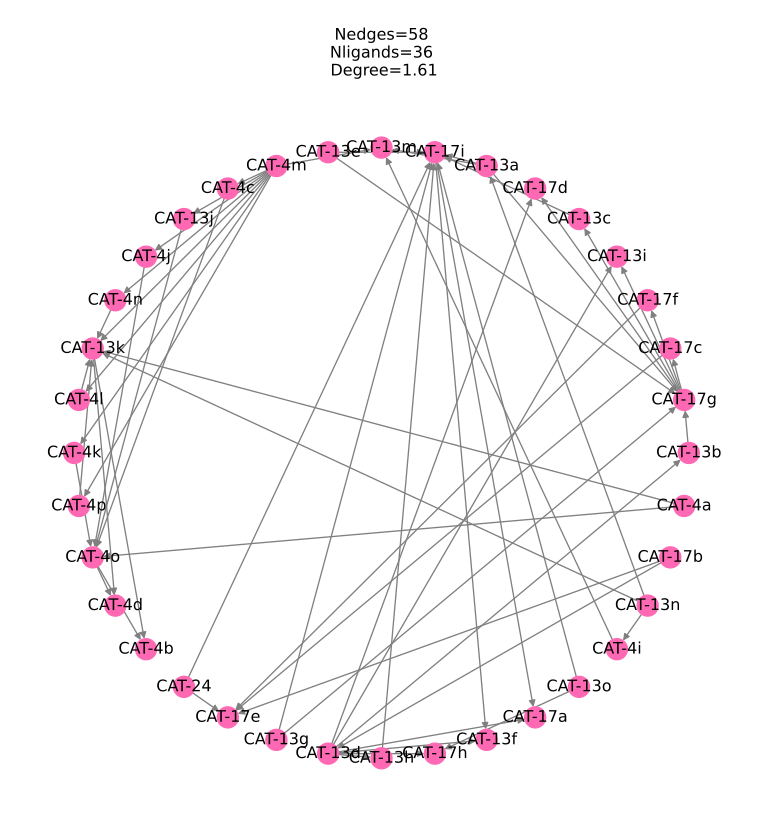
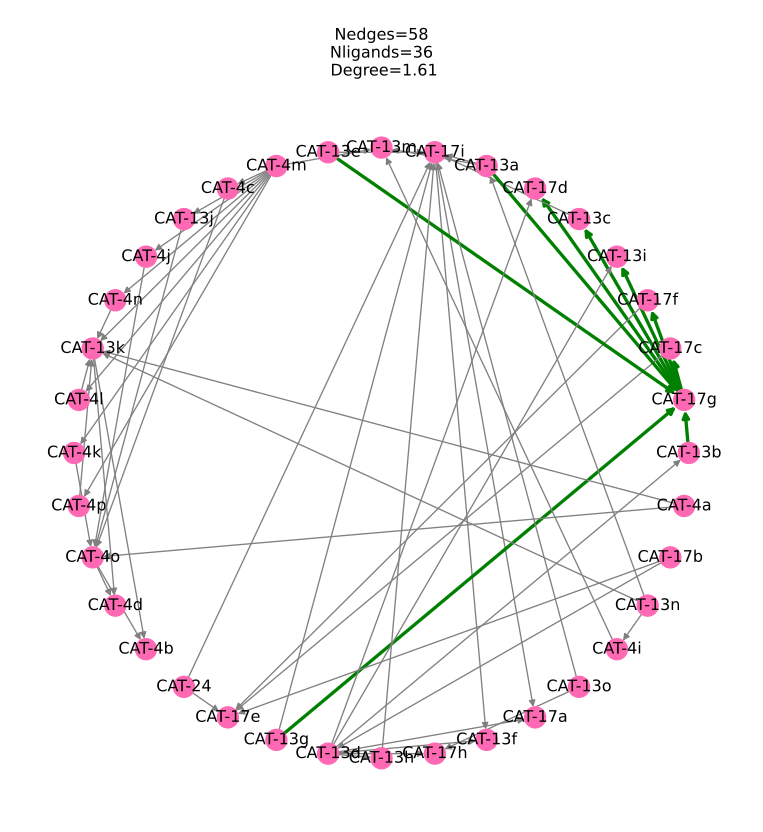
We can also highlight edges within the graph using custom colors via the draw_graph function, for example we can highlight all edges which involve the ligand CAT-17g in green:
highlight_edges = {"green": [(m.labelA, m.labelB) for m in femap if m.labelA == "CAT-17g" or m.labelB == "CAT-17g"]}
femap.draw_graph(highlight_edges=highlight_edges)
Estimating Absolute Binding Free Energies from Relative Affinities#
One of the strengths of cinnabar is that it provides a simulation-agnostic way to estimate absolute binding affinities from relative binding free energy (RBFE) data.
This capability is essential in two common use cases:
Prospective applications: where the ultimate goal is to rank ligands by predicted potency.
Benchmarking exercises: where we want to assess how well RBFE calculations recover experimental rankings.
Once we have a connected network, we can run the MLE solver to generate absolute free energies.
This modifies the FEMap in place:
# this will modify the graph in place adding the MLE estimated values
femap.generate_absolute_values()
absolute_df = femap.get_absolute_dataframe()
absolute_df
| label | DG (kcal/mol) | uncertainty (kcal/mol) | source | computational | |
|---|---|---|---|---|---|
| 0 | CAT-13a | 0.503213 | 0.066349 | MLE | True |
| 1 | CAT-13b | 0.378864 | 0.102983 | MLE | True |
| 2 | CAT-13c | 0.028110 | 0.099052 | MLE | True |
| 3 | CAT-13d | -1.211377 | 0.075449 | MLE | True |
| 4 | CAT-13e | -1.136890 | 0.099052 | MLE | True |
| 5 | CAT-13f | -0.939438 | 0.112062 | MLE | True |
| 6 | CAT-13g | -0.738296 | 0.115062 | MLE | True |
| 7 | CAT-13h | 0.018721 | 0.093682 | MLE | True |
| 8 | CAT-13i | -1.031916 | 0.108354 | MLE | True |
| 9 | CAT-13j | 0.574580 | 0.117088 | MLE | True |
| 10 | CAT-13k | 0.023930 | 0.091079 | MLE | True |
| 11 | CAT-13m | -0.811262 | 0.088522 | MLE | True |
| 12 | CAT-13n | 2.543772 | 0.089216 | MLE | True |
| 13 | CAT-13o | 0.937557 | 0.106555 | MLE | True |
| 14 | CAT-17a | -1.989695 | 0.085190 | MLE | True |
| 15 | CAT-17b | -1.570340 | 0.092320 | MLE | True |
| 16 | CAT-17c | -1.540067 | 0.092647 | MLE | True |
| 17 | CAT-17d | 1.377536 | 0.082133 | MLE | True |
| 18 | CAT-17e | -1.110508 | 0.082703 | MLE | True |
| 19 | CAT-17f | -1.074339 | 0.087225 | MLE | True |
| 20 | CAT-17g | 0.293719 | 0.069740 | MLE | True |
| 21 | CAT-17h | -1.122264 | 0.094168 | MLE | True |
| 22 | CAT-17i | -0.027499 | 0.070761 | MLE | True |
| 23 | CAT-24 | -2.992521 | 0.085422 | MLE | True |
| 24 | CAT-4a | 1.452279 | 0.105029 | MLE | True |
| 25 | CAT-4b | -0.849352 | 0.114541 | MLE | True |
| 26 | CAT-4c | 1.848627 | 0.110923 | MLE | True |
| 27 | CAT-4d | -0.759246 | 0.117046 | MLE | True |
| 28 | CAT-4i | 2.286255 | 0.109747 | MLE | True |
| 29 | CAT-4j | 1.386296 | 0.100368 | MLE | True |
| 30 | CAT-4k | 1.934120 | 0.105023 | MLE | True |
| 31 | CAT-4l | 2.058494 | 0.117528 | MLE | True |
| 32 | CAT-4m | 0.810663 | 0.089598 | MLE | True |
| 33 | CAT-4n | 0.129657 | 0.103610 | MLE | True |
| 34 | CAT-4o | 0.707577 | 0.096058 | MLE | True |
| 35 | CAT-4p | -0.388961 | 0.098955 | MLE | True |
The resulting dataframe records each ligand’s absolute binding free energy estimate, its uncertainty, and metadata such as the source and whether the value is computational. This ensures clear provenance tracking, especially when mixing experimental and computational absolute measurements in the same FEMap.
We can now rank the ligands by predicted potency:
ranked_df = absolute_df.sort_values(by="DG (kcal/mol)", ascending=True)
ranked_df
| label | DG (kcal/mol) | uncertainty (kcal/mol) | source | computational | |
|---|---|---|---|---|---|
| 23 | CAT-24 | -2.992521 | 0.085422 | MLE | True |
| 14 | CAT-17a | -1.989695 | 0.085190 | MLE | True |
| 15 | CAT-17b | -1.570340 | 0.092320 | MLE | True |
| 16 | CAT-17c | -1.540067 | 0.092647 | MLE | True |
| 3 | CAT-13d | -1.211377 | 0.075449 | MLE | True |
| 4 | CAT-13e | -1.136890 | 0.099052 | MLE | True |
| 21 | CAT-17h | -1.122264 | 0.094168 | MLE | True |
| 18 | CAT-17e | -1.110508 | 0.082703 | MLE | True |
| 19 | CAT-17f | -1.074339 | 0.087225 | MLE | True |
| 8 | CAT-13i | -1.031916 | 0.108354 | MLE | True |
| 5 | CAT-13f | -0.939438 | 0.112062 | MLE | True |
| 25 | CAT-4b | -0.849352 | 0.114541 | MLE | True |
| 11 | CAT-13m | -0.811262 | 0.088522 | MLE | True |
| 27 | CAT-4d | -0.759246 | 0.117046 | MLE | True |
| 6 | CAT-13g | -0.738296 | 0.115062 | MLE | True |
| 35 | CAT-4p | -0.388961 | 0.098955 | MLE | True |
| 22 | CAT-17i | -0.027499 | 0.070761 | MLE | True |
| 7 | CAT-13h | 0.018721 | 0.093682 | MLE | True |
| 10 | CAT-13k | 0.023930 | 0.091079 | MLE | True |
| 2 | CAT-13c | 0.028110 | 0.099052 | MLE | True |
| 33 | CAT-4n | 0.129657 | 0.103610 | MLE | True |
| 20 | CAT-17g | 0.293719 | 0.069740 | MLE | True |
| 1 | CAT-13b | 0.378864 | 0.102983 | MLE | True |
| 0 | CAT-13a | 0.503213 | 0.066349 | MLE | True |
| 9 | CAT-13j | 0.574580 | 0.117088 | MLE | True |
| 34 | CAT-4o | 0.707577 | 0.096058 | MLE | True |
| 32 | CAT-4m | 0.810663 | 0.089598 | MLE | True |
| 13 | CAT-13o | 0.937557 | 0.106555 | MLE | True |
| 17 | CAT-17d | 1.377536 | 0.082133 | MLE | True |
| 29 | CAT-4j | 1.386296 | 0.100368 | MLE | True |
| 24 | CAT-4a | 1.452279 | 0.105029 | MLE | True |
| 26 | CAT-4c | 1.848627 | 0.110923 | MLE | True |
| 30 | CAT-4k | 1.934120 | 0.105023 | MLE | True |
| 31 | CAT-4l | 2.058494 | 0.117528 | MLE | True |
| 28 | CAT-4i | 2.286255 | 0.109747 | MLE | True |
| 12 | CAT-13n | 2.543772 | 0.089216 | MLE | True |
Converting Absolute Estimates to pIC50s#
cinnabar can also output absolute estimates of pIC50 values, a dimensionless scale commonly used in drug discovery to express ligand potency. pIC50 is defined as the negative base-10 log of the IC50 value in molar units, you can read more about the benefits of using pIC50 here.
To retrieve the absolute dataframe as pIC50 values, simply pass observable_type="pic50" to get_absolute_dataframe:
abs_pic50_df = femap.get_absolute_dataframe(
    observable_type="pic50",  # pass the observable type "dg" or "pic50"
    temperature=298.15
    * unit.kelvin,  # converting to pic50 requires a temperature which by default is 298.15 kelvin but can be changed
)
abs_pic50_df
| label | pIC50 | uncertainty (unitless) | source | computational | |
|---|---|---|---|---|---|
| 0 | CAT-13a | -0.37 | 0.05 | MLE | True |
| 1 | CAT-13b | -0.28 | 0.08 | MLE | True |
| 2 | CAT-13c | -0.02 | 0.07 | MLE | True |
| 3 | CAT-13d | 0.89 | 0.06 | MLE | True |
| 4 | CAT-13e | 0.83 | 0.07 | MLE | True |
| 5 | CAT-13f | 0.69 | 0.08 | MLE | True |
| 6 | CAT-13g | 0.54 | 0.08 | MLE | True |
| 7 | CAT-13h | -0.01 | 0.07 | MLE | True |
| 8 | CAT-13i | 0.76 | 0.08 | MLE | True |
| 9 | CAT-13j | -0.42 | 0.09 | MLE | True |
| 10 | CAT-13k | -0.02 | 0.07 | MLE | True |
| 11 | CAT-13m | 0.59 | 0.06 | MLE | True |
| 12 | CAT-13n | -1.86 | 0.07 | MLE | True |
| 13 | CAT-13o | -0.69 | 0.08 | MLE | True |
| 14 | CAT-17a | 1.46 | 0.06 | MLE | True |
| 15 | CAT-17b | 1.15 | 0.07 | MLE | True |
| 16 | CAT-17c | 1.13 | 0.07 | MLE | True |
| 17 | CAT-17d | -1.01 | 0.06 | MLE | True |
| 18 | CAT-17e | 0.81 | 0.06 | MLE | True |
| 19 | CAT-17f | 0.79 | 0.06 | MLE | True |
| 20 | CAT-17g | -0.22 | 0.05 | MLE | True |
| 21 | CAT-17h | 0.82 | 0.07 | MLE | True |
| 22 | CAT-17i | 0.02 | 0.05 | MLE | True |
| 23 | CAT-24 | 2.19 | 0.06 | MLE | True |
| 24 | CAT-4a | -1.06 | 0.08 | MLE | True |
| 25 | CAT-4b | 0.62 | 0.08 | MLE | True |
| 26 | CAT-4c | -1.36 | 0.08 | MLE | True |
| 27 | CAT-4d | 0.56 | 0.09 | MLE | True |
| 28 | CAT-4i | -1.68 | 0.08 | MLE | True |
| 29 | CAT-4j | -1.02 | 0.07 | MLE | True |
| 30 | CAT-4k | -1.42 | 0.08 | MLE | True |
| 31 | CAT-4l | -1.51 | 0.09 | MLE | True |
| 32 | CAT-4m | -0.59 | 0.07 | MLE | True |
| 33 | CAT-4n | -0.10 | 0.08 | MLE | True |
| 34 | CAT-4o | -0.52 | 0.07 | MLE | True |
| 35 | CAT-4p | 0.29 | 0.07 | MLE | True |
The new dataframe has updated column names which change automatically: DG (kcal/mol) becomes pIC50 and uncertainty (kcal/mol) becomes uncertainty (unitless) and so any downstream analysis should adjust to the expected outputs accordingly.
The same observable_type argument is also available on get_relative_dataframe() and get_all_to_all_relative_dataframe(), however they accept ddg or dpic50 as they both deal with relative values. They will return DpIC50 and uncertainty (unitless) columns instead of the default DDG (kcal/mol) and uncertainty (kcal/mol) columns.
Applying an Experimental Shift#
The MLE-generated absolute values are always centered around 0, which is fine for ranking a single ligand series, however you might find it useful for visualization or communication to apply an experimental shift to the predicted values to align the means of the predicted and measured affinities.
# load the experimental results to compute the mean shift
experimental_results = pd.read_csv("../cinnabar/data/experimental_data.csv")
mean_shift = np.mean(experimental_results["expt_DG"].values)

# subtract the mean of the calculated absolute values
ranked_df["DG (kcal/mol)"] -= ranked_df["DG (kcal/mol)"].mean()
# shift by the experimental mean
ranked_df["DG (kcal/mol)"] += mean_shift
ranked_df
| label | DG (kcal/mol) | uncertainty (kcal/mol) | source | computational | |
|---|---|---|---|---|---|
| 23 | CAT-24 | -12.318910 | 0.085422 | MLE | True |
| 14 | CAT-17a | -11.316084 | 0.085190 | MLE | True |
| 15 | CAT-17b | -10.896729 | 0.092320 | MLE | True |
| 16 | CAT-17c | -10.866456 | 0.092647 | MLE | True |
| 3 | CAT-13d | -10.537766 | 0.075449 | MLE | True |
| 4 | CAT-13e | -10.463279 | 0.099052 | MLE | True |
| 21 | CAT-17h | -10.448653 | 0.094168 | MLE | True |
| 18 | CAT-17e | -10.436897 | 0.082703 | MLE | True |
| 19 | CAT-17f | -10.400727 | 0.087225 | MLE | True |
| 8 | CAT-13i | -10.358305 | 0.108354 | MLE | True |
| 5 | CAT-13f | -10.265827 | 0.112062 | MLE | True |
| 25 | CAT-4b | -10.175741 | 0.114541 | MLE | True |
| 11 | CAT-13m | -10.137651 | 0.088522 | MLE | True |
| 27 | CAT-4d | -10.085635 | 0.117046 | MLE | True |
| 6 | CAT-13g | -10.064685 | 0.115062 | MLE | True |
| 35 | CAT-4p | -9.715350 | 0.098955 | MLE | True |
| 22 | CAT-17i | -9.353888 | 0.070761 | MLE | True |
| 7 | CAT-13h | -9.307668 | 0.093682 | MLE | True |
| 10 | CAT-13k | -9.302459 | 0.091079 | MLE | True |
| 2 | CAT-13c | -9.298279 | 0.099052 | MLE | True |
| 33 | CAT-4n | -9.196732 | 0.103610 | MLE | True |
| 20 | CAT-17g | -9.032670 | 0.069740 | MLE | True |
| 1 | CAT-13b | -8.947525 | 0.102983 | MLE | True |
| 0 | CAT-13a | -8.823176 | 0.066349 | MLE | True |
| 9 | CAT-13j | -8.751809 | 0.117088 | MLE | True |
| 34 | CAT-4o | -8.618812 | 0.096058 | MLE | True |
| 32 | CAT-4m | -8.515726 | 0.089598 | MLE | True |
| 13 | CAT-13o | -8.388831 | 0.106555 | MLE | True |
| 17 | CAT-17d | -7.948853 | 0.082133 | MLE | True |
| 29 | CAT-4j | -7.940093 | 0.100368 | MLE | True |
| 24 | CAT-4a | -7.874109 | 0.105029 | MLE | True |
| 26 | CAT-4c | -7.477762 | 0.110923 | MLE | True |
| 30 | CAT-4k | -7.392269 | 0.105023 | MLE | True |
| 31 | CAT-4l | -7.267895 | 0.117528 | MLE | True |
| 28 | CAT-4i | -7.040134 | 0.109747 | MLE | True |
| 12 | CAT-13n | -6.782617 | 0.089216 | MLE | True |
Recap#
cinnabarprovides a simulation-agnostic API for absolute binding affinity estimation from RBFE networks.FEMapis built by adding relative calculations (viaadd_relative_calculationoradd_measurement).The network connectivity can be checked with
FEMap.check_weakly_connected().Absolute affinities are generated in place using
FEMap.generate_absolute_values()and retrieved withFEMap.get_absolute_dataframe().Absolute estimates can be retrieved as pIC50 values by passing
observable_type="pic50"toFEMap.get_absolute_dataframe().Predicted absolute affinities are centered around
0, but can be shifted to align with experiment if needed.
That completes the basic tutorial of using the cinnabar API for absolute affinity estimation. Hopefully, this demonstrates the flexibility of the API and gives you an idea of how this might be incorporated into a free energy pipeline using any relative free energy prediction software.
Plotting Relative and Absolute Free Energy Predictions with cinnabar#
cinnabar provides high-level plotting functions (powered by Matplotlib or Plotly) for analyzing and comparing relative and absolute binding free energy calculations. All analysis and visualization defaults follow standardized best practices from the community guidelines
, ensuring your results are robust, reproducible, and interpretable.
In this example, we will analyze a set of relative binding free energies computed with OpenFE, and compare them with experimental affinities, a common task in the benchmarking and validation of a free energy pipeline.
First lets add the experimental measurements to the femap created above:
for _, exp_row in experimental_results.iterrows():
    femap.add_experimental_measurement(
        label=exp_row["Ligand"],
        value=exp_row["expt_DG"] * unit.kilocalorie_per_mole,
        uncertainty=exp_row["expt_dDG"] * unit.kilocalorie_per_mole,
        source="Experimental",
    )
We can check that all experimental data points were correctly matched to the ligands involved in the calculated relative free energies by checking the number of ligands in the graph, we should still have 36:
print(femap.n_ligands) # make sure we still have 36 ligands
36
Plotting Relative Free Energies (ΔΔG)#
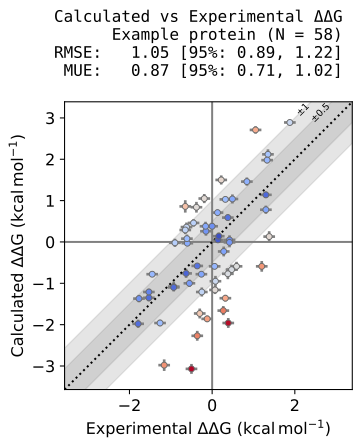
Relative free energy plots allow direct comparison of calculated and experimental ΔΔG values. These plots follow best practices:
Only error statistics (RMSE, MUE) are shown by default. Correlation measures (R², ρ) are not meaningful here, because the direction of a relative transformation is arbitrary.
Uncertainty estimates are bootstrapped (1000 samples with replacement) to provide 95% confidence intervals.
plotting.plot_DDGs(
    femap,  # the FEMap containing both the calculated and experimental values
    source="OpenFE",  # the source of the calculated values to plot
    target_name="Example protein",  # the name of the target which will be used in the plot title
    title="Calculated vs Experimental ΔΔG",  # the title of the plot
    figsize=5,  # the size of the figure, a single number will be used for both dimensions, or a tuple can be provided for (width, height)
)
Symmetry in relative data#
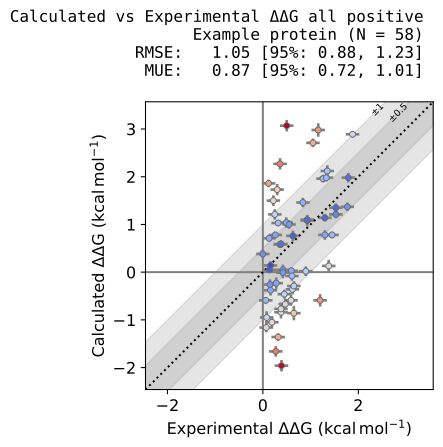
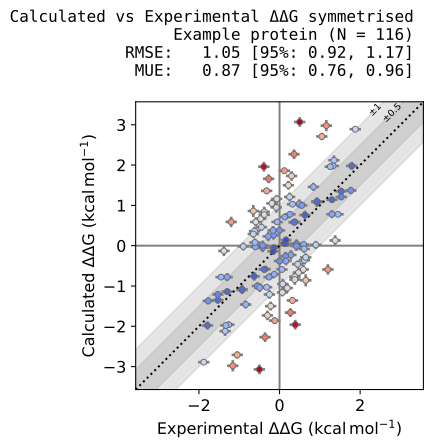
Relative transformations are symmetric: ΔΔG(A→B) = –ΔΔG(B→A). This arbitrariness motivates different visualization strategies, without changing the statistics:
plotting.plot_DDGs(
    femap,
    source="OpenFE",
    target_name="Example protein",
    title="Calculated vs Experimental ΔΔG all positive",
    figsize=5,
    map_positive=True,  # Map all relative free energies to have a positive experimental value
)
plotting.plot_DDGs(
    femap,
    source="OpenFE",
    target_name="Example protein",
    title="Calculated vs Experimental ΔΔG symmetrised",
    figsize=5,
    symmetrise=True,  # Symmetrise the plot by plotting each point twice
)
Customizing plots#
By default, RMSE and MUE are reported. You can add additional metrics (e.g. relative absolute error, RAE) and choose whether to report the sample value (mle) or the bootstrap mean (mean):
plotting.plot_DDGs(
    femap,
    source="OpenFE",
    target_name="Example protein",
    title="Calculated vs Experimental ΔΔG",
    figsize=5,
    statistics=["RMSE", "MUE", "RAE"],  # add RAE to the plot,
    statistic_type="mean",  # change the reported value from the sample value to the mean of the bootstrapped samples
)
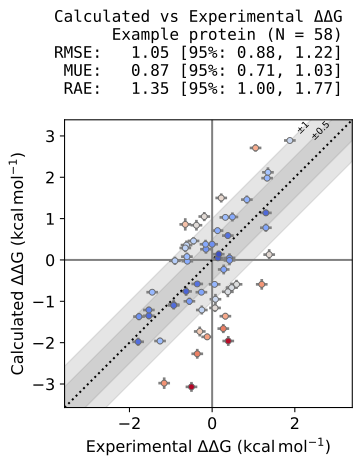
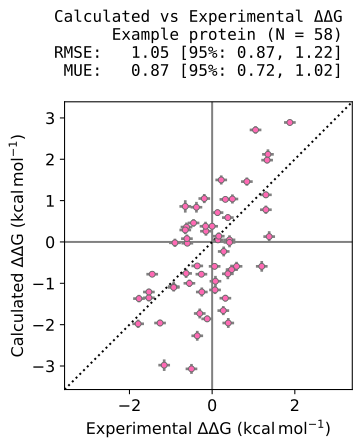
Plots include shaded guidelines (0.5 and 1 kcal/mol) and color points by absolute error. Both are customizable:
# turn off the guidelines and change the color of the points to hotpink
plotting.plot_DDGs(
    femap,
    source="OpenFE",
    target_name="Example protein",
    title="Calculated vs Experimental ΔΔG",
    figsize=5,
    guidelines=False,  # Turn off the guidelines
    color="hotpink",  # use a custom color
)
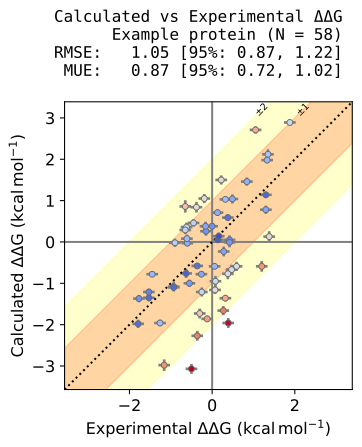
# use guidelines at 1 and 2 kcal/mol with custom colors
plotting.plot_DDGs(
    femap,
    source="OpenFE",
    target_name="Example protein",
    title="Calculated vs Experimental ΔΔG",
    figsize=5,
    guidelines=[1, 2],  # set the guideline values to 1 and 2 kcal/mol
    guideline_colors=["red", "yellow"],  # use custom colors for the guidelines
)
For full control, pass Matplotlib settings via scatter_kwargs which will be joined with any default styling applied by cinnabar:
plotting.plot_DDGs(
    femap,
    source="OpenFE",
    target_name="Example protein",
    title="Calculated vs Experimental ΔΔG",
    figsize=5,
    scatter_kwargs={"marker": "D"},
)
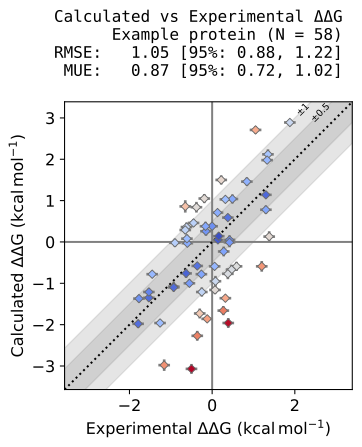
If no filename is provided, the plotting function returns a Matplotlib Figure for further customization.
Plotting Absolute Free Energies (ΔG)#
Absolute free energies can be estimated from a sufficiently connected relative free energy network as shown in the above tutorial. Internally, cinnabar applies a maximum likelihood estimator (MLE) to reconstruct the set of ΔG values most consistent with the relative data. This is performed explicitly via FEMap.generate_absolute_values() and should be done prior to plotting.
plotting.plot_DGs(
    femap,
    source="MLE",  # plot the MLE estimated absolute free energies
    figsize=5,
    target_name="Example protein",
    title="Absolute Free Energies",
)
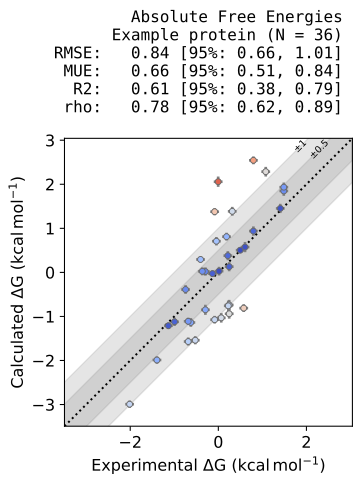
Here, both error and correlation statistics (RMSE, MUE, R², ρ) are reported, since absolute data are directional and correlation is meaningful.
Applying an Experimental Shift#
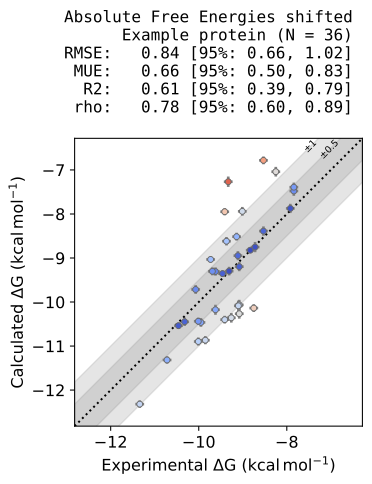
When comparing absolute free energies from different methods, it is sometimes useful to apply a constant shift so that the predicted values align with the experimental mean.
This does not change the relative ranking of ligands or the spread of errors — it only removes the arbitrary offset that arises from the MLE reconstruction of absolute ΔGs. This way, plots are visually centered on the experimental trend, which can help with presentation and comparison.
plotting.plot_DGs(
    femap,
    source="MLE",
    target_name="Example protein",
    title="Absolute Free Energies shifted",
    figsize=5,
    shift=mean_shift,
)
Plotting Absolute Estimates as pIC50s#
The plotting functions also expose the ability to convert estimated absolute binding free energies to pIC50 estimates using the observable_type and temperature arguments similar to the dataframe API described above:
plotting.plot_DGs(
    femap,
    source="MLE",
    target_name="Example protein",
    title="Absolute Ligand Potency",
    figsize=5,
    observable_type="pic50",  # plot the pic50 values instead of the dg values
)
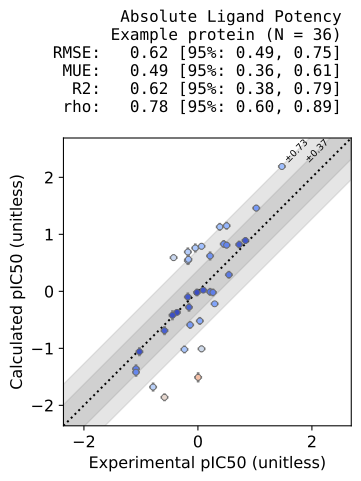
The resulting plot contains the same output metrics, now calculated in pIC50s. The RMSE and MUE are different from the plot above because the scale has changed, however the correlation statistics (R² and ρ) are unchanged as pIC50 is a linear rescaling of ΔG, so the relative ordering and spread of values are preserved. The guidelines are also updated automatically to the equivalent value in pIC50 but can be set explicitly by passing a tuple of values to the guidelines argument.
Plotting All ΔΔGs (from reconstructed ΔGs)#
By default, relative plots show only the ΔΔGs that were directly simulated (i.e., edges in your transformation graph). However, once absolute free energies (ΔGs) are reconstructed with the MLE, you can compute all pairwise ΔΔGs between ligands.
This has two advantages:
Network-independent comparisons: Different methods may have used different transformation graphs. By reconstructing all ΔΔGs from absolute values, you can compare methods on a common set of relative predictions.
Complete benchmarking: This approach makes it easy to see systematic trends across the full ligand set, not just those pairs chosen for RBFE calculations.
For example, you can generate a plot of all ΔΔGs like this:
plotting.plot_all_DDGs(femap, source="MLE", figsize=5, target_name="Example protein", title="All pairwise ΔΔG")
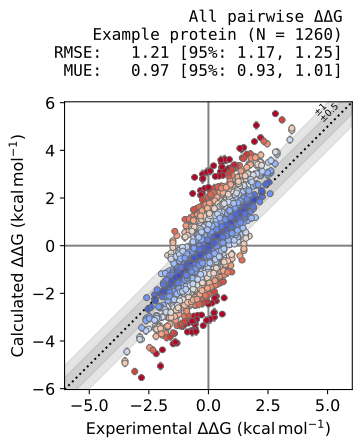
Again, the same best-practices defaults apply (error statistics only, bootstrapped confidence intervals).
Plotting Custom Comparisons using pair_plot#
Use pair_plot when you want to compare two computational results for the same target. It applies the standard cinnabar scatter styling but accepts numpy arrays (x, y and optional error arrays) rather than an FEMap. This gives you total control of data preparation and allows for comparisons between arbitrary methods.
Comparing Relative Free Energies (ΔΔG)#
Suppose you have two different computational approaches and want to compare their performance on a set of relative binding free energies. In this example we will add a second set of computational results to the FEMap which are the same as the first with added random noise and then plot them against each other.
# make a new femap to hold our predictions
femap_two_methods = FEMap()

# copy over the relative free energy calculations from the original femap
# and add a second copy with random noise added to the values to simulate a second method
np.random.seed(42)
for m in femap:
    if m.computational and m.source == "OpenFE":
        femap_two_methods.add_relative_calculation(
            labelA=m.labelA,
            labelB=m.labelB,
            value=m.DG,
            uncertainty=m.uncertainty,
            source="OpenFE",
        )
        femap_two_methods.add_relative_calculation(
            labelA=m.labelA,
            labelB=m.labelB,
            value=m.DG + np.random.normal(scale=0.5) * unit.kilocalorie_per_mole,  # add some noise to the values
            uncertainty=m.uncertainty,
            source="Noisy OpenFE",
        )
We can now extract the relative estimates into a sorted dataframe and manually compare the methods using pair_plot.
# build dataframes and align by the transformation pairs
relative_df = femap_two_methods.get_relative_dataframe()
openfe_df = relative_df[relative_df["source"] == "OpenFE"].set_index(["labelA", "labelB"])
noisy_df = relative_df[relative_df["source"] == "Noisy OpenFE"].set_index(["labelA", "labelB"])

# use numpy arrays with pair_plot
plotting.pair_plot(
    x=openfe_df["DDG (kcal/mol)"].to_numpy(),  # provide the x values for the plot
    y=noisy_df["DDG (kcal/mol)"].to_numpy(),  # provide the y values for the plot
    xerr=openfe_df["uncertainty (kcal/mol)"].to_numpy(),  # provide the x error values for the plot
    yerr=noisy_df["uncertainty (kcal/mol)"].to_numpy(),  # provide the y error values for the plot
    title="Correlation of OpenFE and Noisy OpenFE",
    xlabel="OpenFE",  # match the x and y labels to the values being plotted
    ylabel="Noisy OpenFE",
    figsize=5,
    statistics=["RMSE", "MUE"],  # add RMSE and MUE to the plot along with the confidence intervals from bootstrapping
);
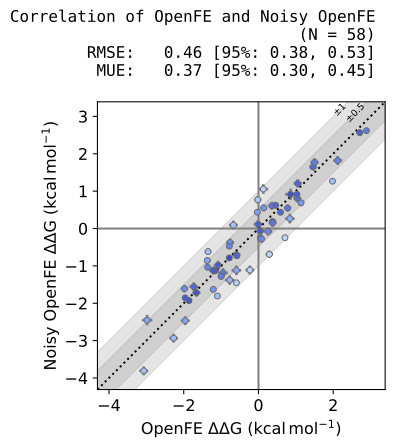
The pair_plot function supports the same customisation options as the above plotting functions, while giving you complete control over the data preparation procedure so you can create familiar plots for different types of analysis.